Categories
AI Max treats all your keywords as broad match, even if you only have exact and phrase match versions of your keywords. At the same time, reporting changes make it harder to see what’s working. Here’s how to adapt your keyword workflow and maintain control of your search terms.
AI Max also includes text customization and URL expansion, which we’ll cover in a future article.
When not to use AI Max
First things first. We’re not against AI Max, but we wouldn’t advise using it if:
- You’ve experimented with broad match, and it hasn’t worked well for your campaigns.
- You have mostly exact and phrase match keywords, and you have a high Lost impression share due to budget. AI Max may actually lower your performance by reallocating budget from top keywords to lower-performing terms.
- You don’t want to use text customization or final URL expansion. Instead, you can just add broad match keywords to your campaign. This also means you can control exactly which keywords use broad match.
Before using broad match, it’s also essential that you’re using an appropriate bid strategy.
How AI Max works with your existing keywords
If you don’t have a broad match version of a keyword, then AI Max treats your existing keywords as both their original match type and as broad match.
Google needs to assign impressions, clicks, cost, etc, to your keywords each time they trigger an impression. If you don’t have the broad match keyword, then Google assigns the AI Max data to phrase or exact match in most cases. This creates two challenges:
- When your keywords have data from multiple match types, you can no longer evaluate how each match type is performing.
- AI Max data can be misleading. AI Max expanded matches may include traffic you were already receiving from your exact and phrase keywords.
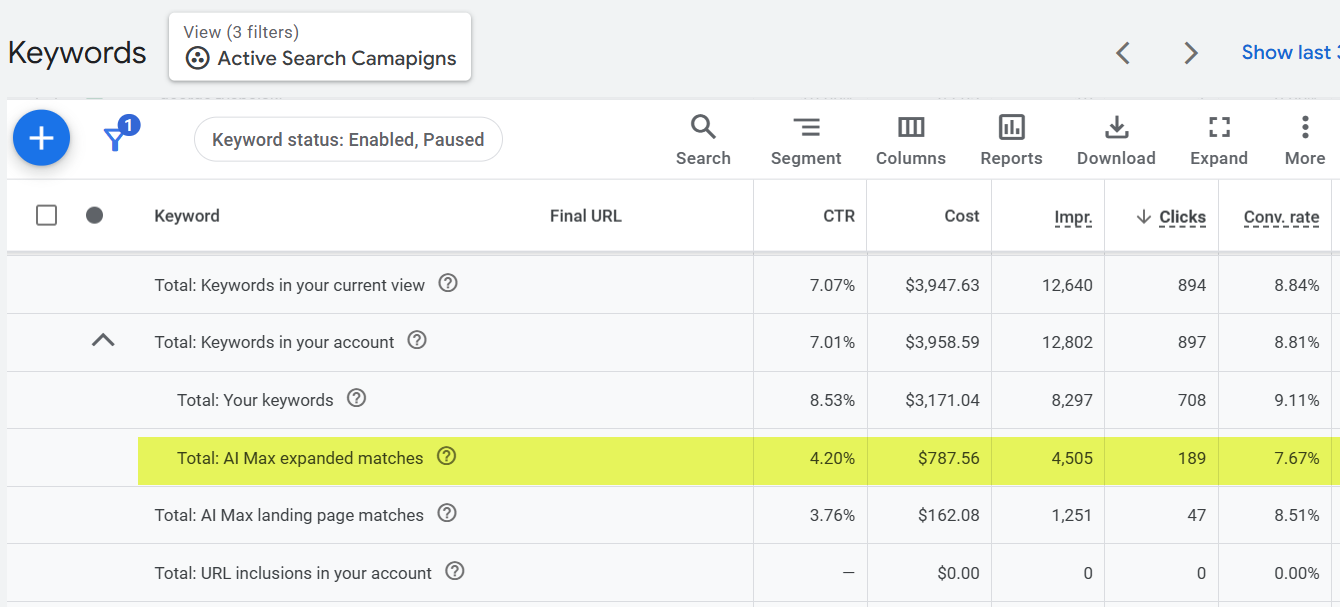
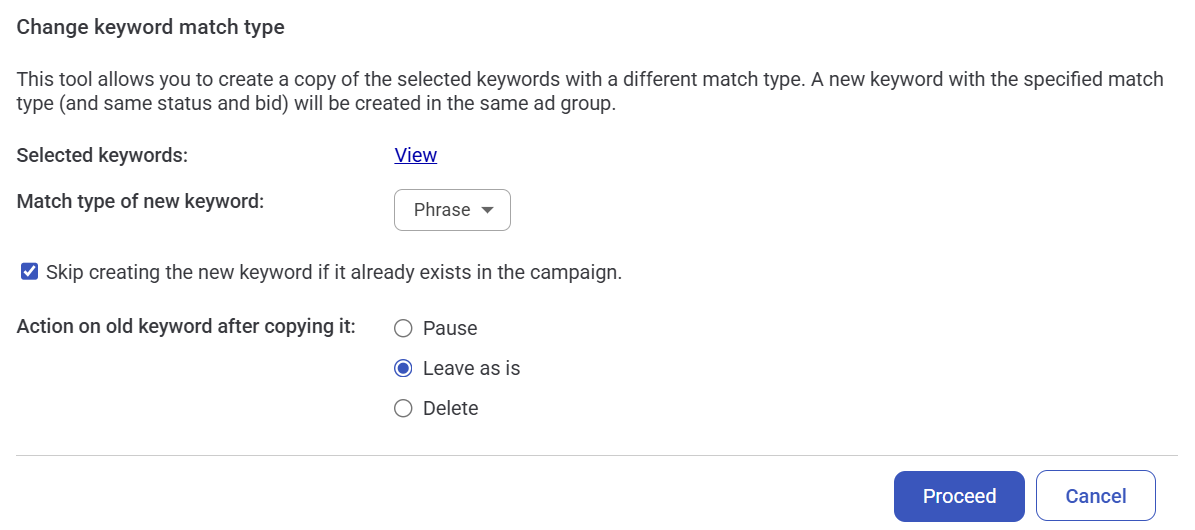
Therefore, you’ll want to add your exact and phrase match keywords as broad match terms so you can tell how each match type is performing. You can use the keyword management tool in Adalysis to quickly add your keywords as broad match. It also avoids creating duplicate keywords.
How to manage your AI Max search terms
When you enable AI Max, your search term data will include an additional match type column. Start by filtering your data by AI Max and then review your totals.
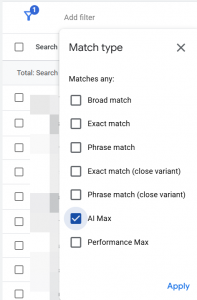
This is similar to evaluating your keywords, except now we’re going to dig deeper into the search terms that AI Max is taking credit for.

Common AI Max behaviors
As you examine your data, you’ll notice a few very common points with AI Max search terms:
- Brand terms often match to non-brand terms
- Non-brand terms often match to competitor terms
- Sometimes, brand terms match to competitor terms
It’s best to create negative keyword lists with relevant additions to separate brand and non-brand traffic.
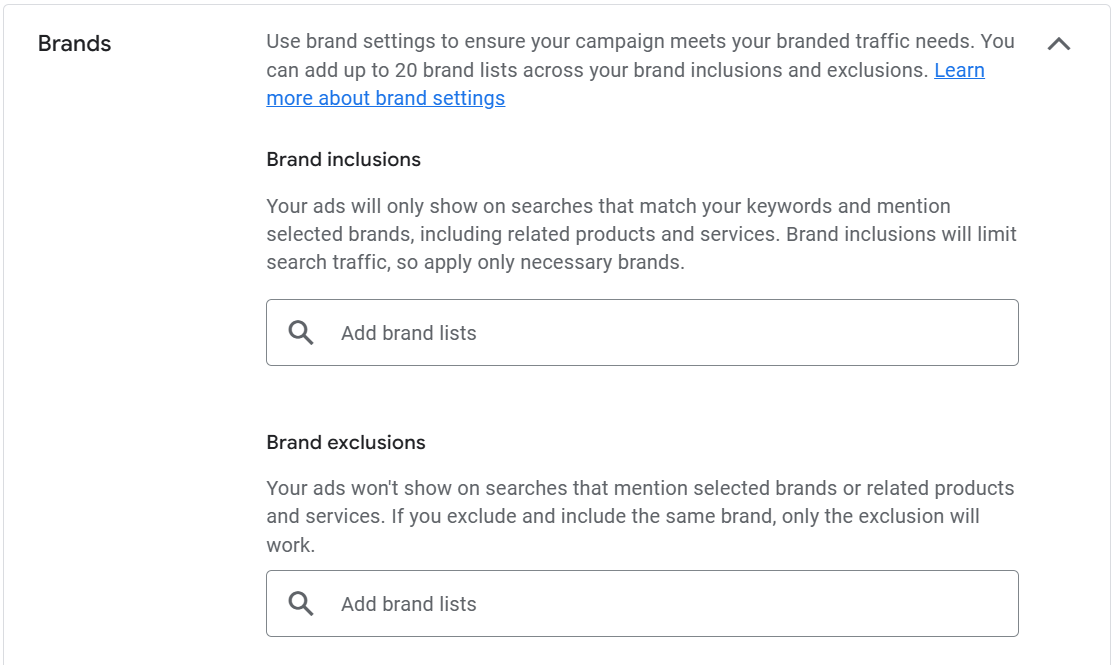
Technically, you can use brand inclusions and exclusions in your campaign settings. However, we find that a lot of misspellings or word variations aren’t caught by brand filters.
New searches vs existing queries
AI Max doesn’t always find new search terms. Instead, it will often show for the same queries as your exact or phrase match keywords. It’s easy to see why.
Phrase and exact match keywords usually have higher conversion rates than broad match. When AI Max gets credit for existing keywords, it makes its reports look better.
Take the search terms for this keyword, for example. Some impressions are attributed to the exact match version of that keyword, and others to AI Max. That means AI Max is claiming results for a keyword that was already in our campaign and for conversions we would have received anyway.
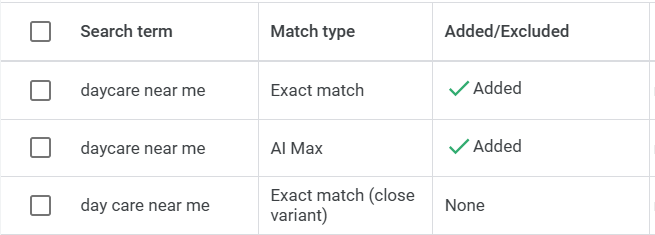
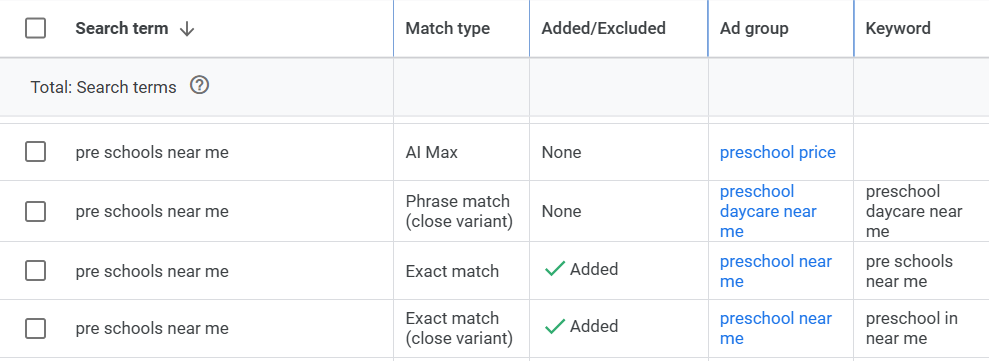
AI Max also doesn’t appear to follow the standard Google hierarchy of match types. Usually, if the search term is identical to a keyword, that keyword should receive the impression.
Here, AI Max matches a location-based search (near me) to a pricing ad group. This is despite an identical version of that keyword in a location-focused ad group.
AI Max search terms without associated keywords
Some AI Max search terms aren’t associated with keywords. We’ve tried to correlate these keywordless search terms across Google Ads, but nothing lines up.
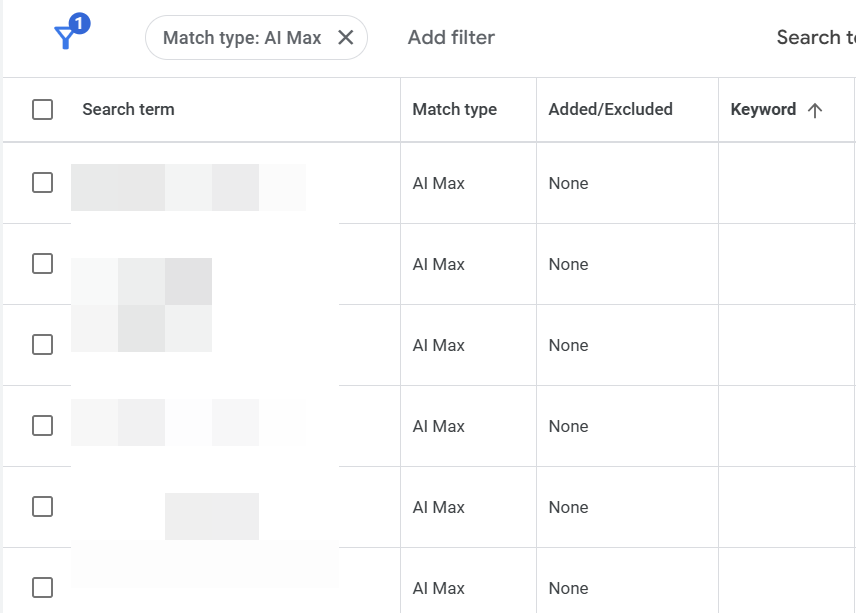
Broad match can match to words on your landing page and previous search terms. We investigated if broad match terms in non-AI Max campaigns had this issue, but couldn’t find any examples.
This might be related to Google’s keywordless technology, that’s part of AI Max. However, their benefit description doesn’t state this is the root cause of blank keyword data. We need Google’s input on this phenomenon, as there’s no way to find out why we’re showing for these search terms.

There’s also no easy way to assess AI Max results, because AI Max can steal impressions from phrase and exact match. The only accurate method is to de-duplicate AI Max from exact and phrase match search terms. It’s heavy spreadsheet work, but it allows you to see the true impact of AI Max, not the performance shifted from existing keywords.
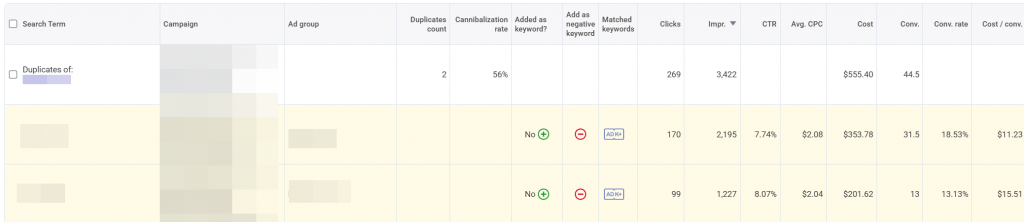
Note for Adalysis subscribers: The duplicate search term alert within Adalysis is the easiest way to find and manage search terms appearing from multiple ad groups.
Google’s priority order
According to Google, this is how the matching works:
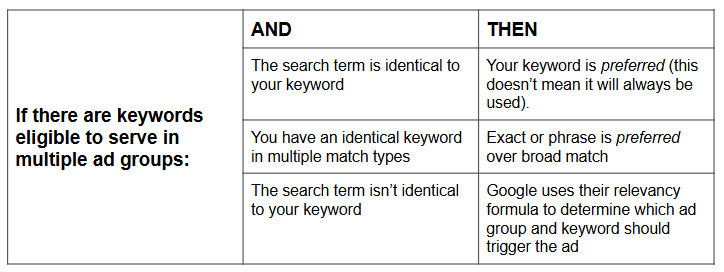
Within an ad group, if the search term is the same as the keyword or is considered a close variant, then the search term’s data should be attributed to the exact match keyword.
Note: There isn’t a definition of what preferred means in this context or how much priority Google gives to preferred matches over other possibilities.
These findings have two implications:
1. Add your top search terms as exact match keywords.
When match types changed a few years ago, we started seeing Google commonly serving the incorrect ad groups for search terms. The expansion of PMax often made the cannibalization of your top search terms even worse. PMax would steal some of your most valuable search impressions and allocate them to poorly performing PMax asset groups.
Unfortunately, this has caused an issue where many advertisers need to add misspellings and word variations as keywords, commonly in exact match, even if they are marked as exact match close variants. This seems like a regression in search tactics to the early days of Google Ads.
2. Your AI Max Totals are not incremental gains
AI Max data doesn’t reflect actual performance, because it attributes impressions from your exact and phrase match keywords to AI Max search terms.
Wrap-up
AI Max offers some interesting features that can make campaign management easier and more scalable. But assessing its impact on search terms isn’t as simple as reviewing the AI Max totals.
If you’re going to try AI Max, you’ll want to make sure to:
- Add all your keywords as broad match variants.
- Monitor your search terms so that brand, non-brand, and competitor queries are shown (or blocked) appropriately.
- Continue adding your top search terms as exact match keywords.
- Review your search terms for potential negative keywords.
Search term management should remain a core part of your management strategy in the AI era. Whether you’re adding broad match keywords or using AI Max, you’ll want to spend your budget wisely. Add positive and negative keywords to direct spend to your best-performing queries.
Subscribe today to get future articles straight to your inbox. Next, we’ll get into AI Max text customization and final URL expansion.
Share around the web


Related posts
View all
Search term challengesAl Max
Search term challenges Al Max




Improve performance
with
actionable
analysis


Hey Brad, If the search query source is listed as AI Max, does that mean that the click happened from an AI Overview?
Hi Terry,
No. It means that Google decided that a search term could match to that keyword. It could be from search, AI Overviews, etc. There’s not a way to tell AI Overview clicks right now.
Leave a comment