Categories
Google recently announced more quality score data in Google Ads, including a historical quality score. Adalysis is the first system to let you see and filter on all the sub-factors (expected CTR, landing page experience, and ad relevance) – we’re all for transparency in reporting.
While Google has brought more data to Quality Score, we want to show why Adalysis provides the diagnostics to easily improve quality scores.
#1 Quality score graphs
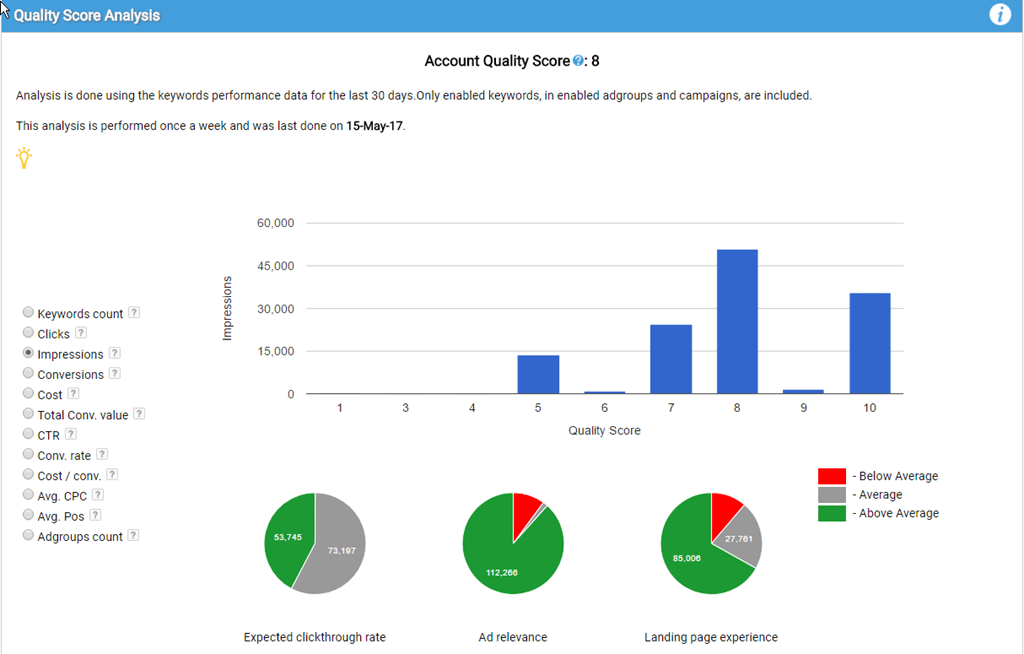
View your account or campaign level quality scores, then graph your data and see the sub-factors by a large variety of metrics. Quickly answer any of these questions and more:
- Do most of your keywords have high or low quality scores?
- Do you have a CPC discount by quality score?
- What’s your CTR by quality score?
- Does your CPA differ by quality scores?
- What are your ad groups by quality score?
#2 Impression weighting
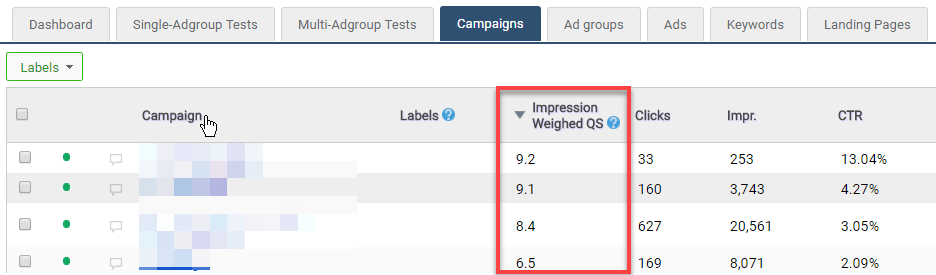
Across your campaigns and ad groups, you can easily find your impression-weighted quality score. Using impression-weighted data means that you won’t be misled by averages. For example, let’s say you have one keyword with a quality score of 1 and 1 impression and another keyword with 10,000 impressions with a quality score of 10. Your impression weighted Quality Score is quite high, which is better than a misleading average of 5.5.
You can find your impression-weighted quality scores at the account, campaign, and ad group levels.
#3 Priority order
Adalysis is all about taking action fast. If a machine can do it just as well as a human, a person should never waste their time. One of the biggest time wasters (outside of ad testing) is trying to find out where to start. Adalysis has you covered.
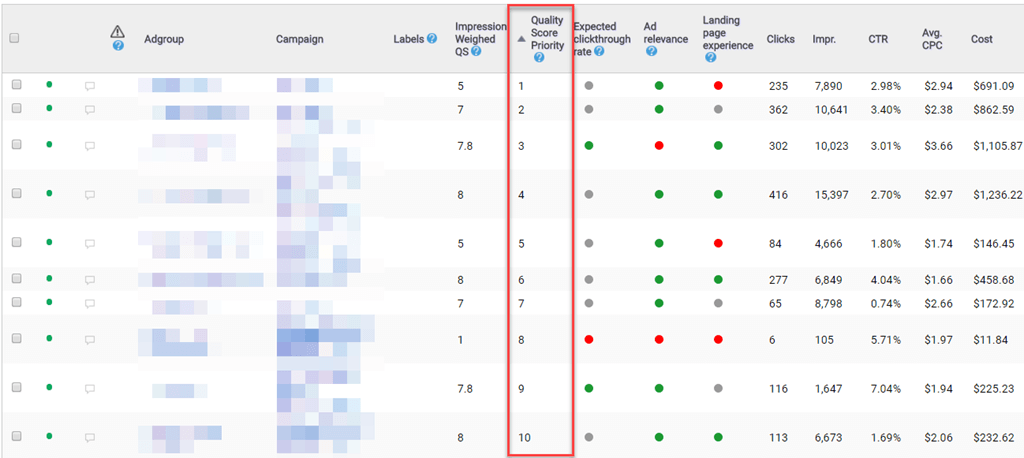
We analyze the impression-weighted quality score and your spend data, running them through an algorithm to show which ad groups need the most quality score assistance.
Simply sort by Quality score priority and find the ad group that needs the most help.
#4 Sub-factor weighting
Of course, knowing what ad group needs the most help doesn’t tell you the type of help it needs. Therefore, we impression-weight the quality score sub-factors and color-code them. This means you can tell at a glance what you should work on for any one ad group.
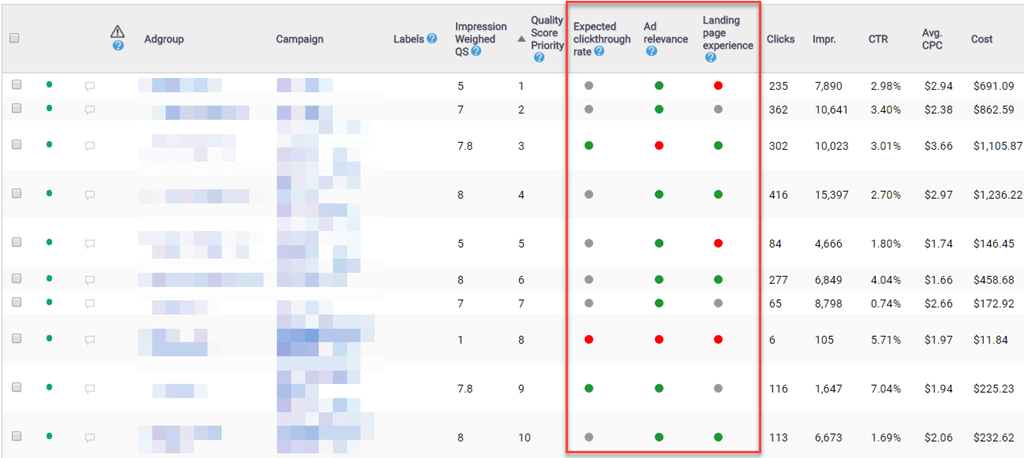
For instance, the ad group with the highest priority has a below-average landing page experience. The second ad group has landing page and CTR issues, while the third ad group has a relevance problem. At a glance, you can see what the overall issue is for each ad group and quickly get to work.
#5 Filter by sub-factors
We were the first platform to provide this data in a scalable manner and help you easily filter, sort, and diagnose the quality score sub-factors for every keyword.
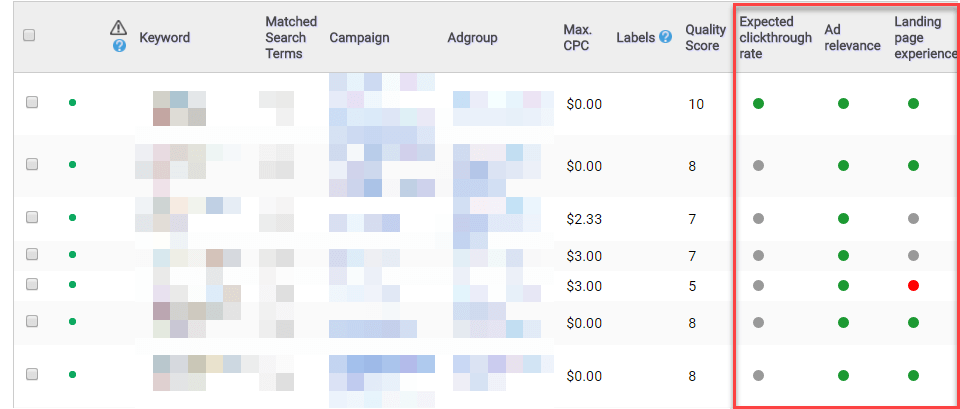
#6 Understand the landing page & keyword relationships
Trying to diagnose your landing page quality scores can be difficult. We show you all the landing pages used in multiple ad groups and then aggregate the quality score data across your account. This lets you easily see how many keywords are above, average, and below average for these landing pages, as well as the actual keyword list.

This makes it easy to find keywords that need new landing pages and high-performing landing pages you can replicate.
Wrap-up
Adalysis is built on the principles that PPC marketers are too time-strapped for redundant data diagnostics. Instead, use your knowledge to take actions. We’ll point you to what needs to be done inside the account so you can get out of Excel number crunching and use your skills to improve your account.
We applaud Google for making quality scores easier to view. If you’d like to find out more about Adalysis, check out our quality score tools or start your free trial.
Share around the web


Related posts
View all
When to pause exact match and rely on broadmatch instead
When to pause exact match and rely on broad match instead
Search term challengesAl Max
Search term challenges Al Max



Improve performance
with
actionable
analysis


Leave a comment