KPI monitoring & diagnosis: why does your CTR change over time?
By Brad | 1 comment October 8, 2019
Categories
Continuing our KPI monitoring & diagnosis series, we’re going to dig into examining changes to click through rate (CTR). This is is one of the more complicated changes as there are so many factors that might be involved.
As a reminder, this data doesn’t exist in a vacuum. It’s easiest to see this information in the context of other data in your account, which is why we suggest you use the Adalysis Performance Analyzer or Looker Studio reports to see how these metrics are interrelated. You can see how to turn these reports into stories or get a copy of the Looker Studio report here.
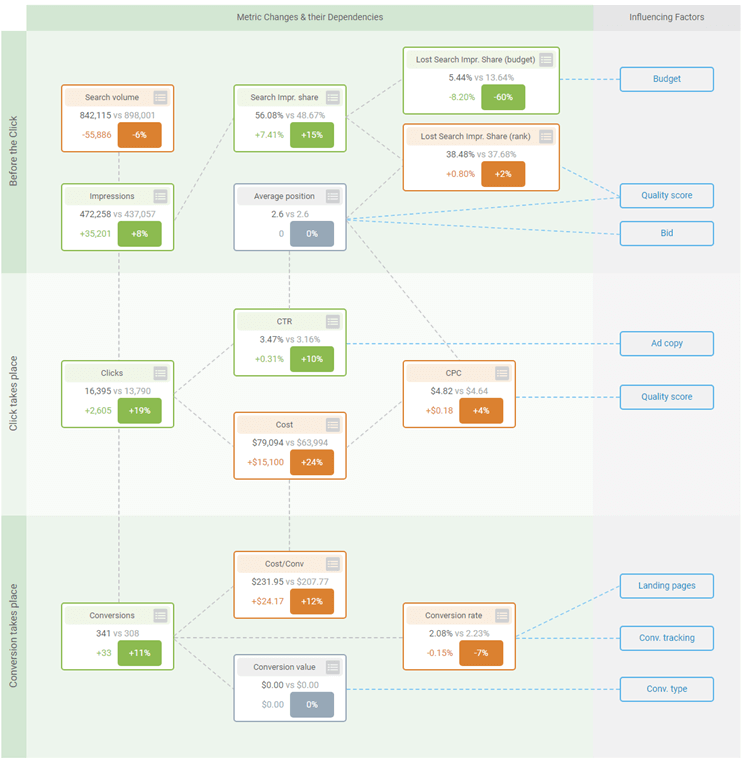
(Click image to see the full details)
Usually, CTR changes come from one of these key areas:
- Total data consistency
- Ad changes
- Ad types
- Ad testing
- Ad rotation
- Organizational changes
- Ad group organization
- Campaign settings
- Impression changes
- Bidding
- Quality Score
- Targeting changes
- Budget
- Match type usage
- Duplicate keywords/search terms
These changes can often be interwoven, and you need to follow the cascading effects of decisions. For example, we saw an account that took a nosedive in CTR and conversion rates due to this chain of events:
- User turned on enhanced CPC bidding
- Google automatically changed the ad rotation to ‘optimize’ if you use any smart bidding options
- In the campaign’s top impression ad group, Google started showing the 2nd worst CTR and worse converting ad the most
The apparent cause of the problem was the top performing ads were showing less often; the root cause was trying eCPC bidding. It’s these cascading effects that can make diagnosing CTR changes difficult at times.
We’ll break down each area so you have a checklist to diagnose why CTRs change over time.
Total data consistency
It’s worth nothing that the more data you have, the more stable CTRs become (unless there’s a change). If you get 100 impressions a month, a single click can change your CTRs quite dramatically. This is why it’s common to see some ad groups have massive CTR swings month over month and it’s only due to a few click differences.
Once you’re in the thousands or millions of monthly impressions, the data becomes stable. Always keep in mind how much data you’re looking at each month and the level you’re reviewing (ad group, campaign, groups of campaigns) to avoid reading too much into tiny movements.
How ads affect CTR
Ad types
The ad types you use can affect CTR. RSAs usually have higher CTRs than ETAs (and lower conversion rates). As you know the message in ETAs, their data is more stable than RSAs month over month. It’s not uncommon to see an ad group or campaign that only uses RSAs to have some wide swings in CTR and conversion rates.
Ad testing
As you introduce new ads, your CTRs will naturally change as the new ads will now be served in place of the old ads for some impressions.
Ad rotation
When you use ‘rotate’ as your ad serving option, your CTRs are generally stable and changes in CTRs come from changes to the ads (or targeting and other areas we’ll get to) and not due to the other ads in the ad groups taking impressions from your top ads.
When you use ‘optimize’, it’s common to see some wide swings in data on occasion as Google is often optimizing for CTR (over conversion rates) and the system can make mistakes in the ad serving. These mistakes can affect your CTRs.
For example, in this ad group, the ad with the lowest CTR (0.35% vs. 2.32%) has been served 42,428 times versus the higher CTR ads 27,875 impressions.
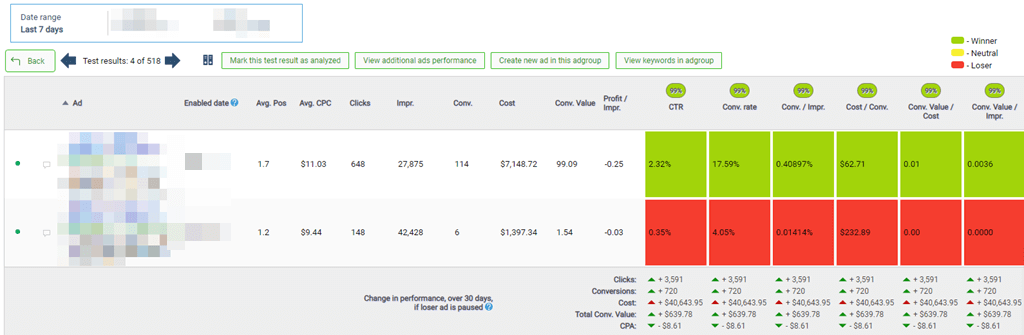
When nothing else changes, CTR moves often come from a different mix of ads getting impressions. You’ll need to check high-impression ad groups to see which ads became the new winners. This doesn’t happen very often is you use ‘rotate’ ad serving, but it’s more common with ‘optimize’.
Organizational changes
Campaign settings
This should be super obvious, but in the interest of completeness, it needs to be said. If you change your campaign settings, this can affect your CTR.
For instance, if you change where your ads are served (locations), then you could have different CTRs in these new locations. If you were only on desktops and started to include mobile devices, then your CTRs will be different by device and directly affect your CTRs.
Search terms, keywords and ad groups
If you change anything about your organization, from campaigns to ad groups, expect to see CTR changes. For instance, if you move a keyword from one ad group to another one, then you’ll usually have a different ad in the new ad group, and thus a different CTR will be the result.
The most common thing that happens is you are examining your search terms to find new keywords with a pretty standard workflow:
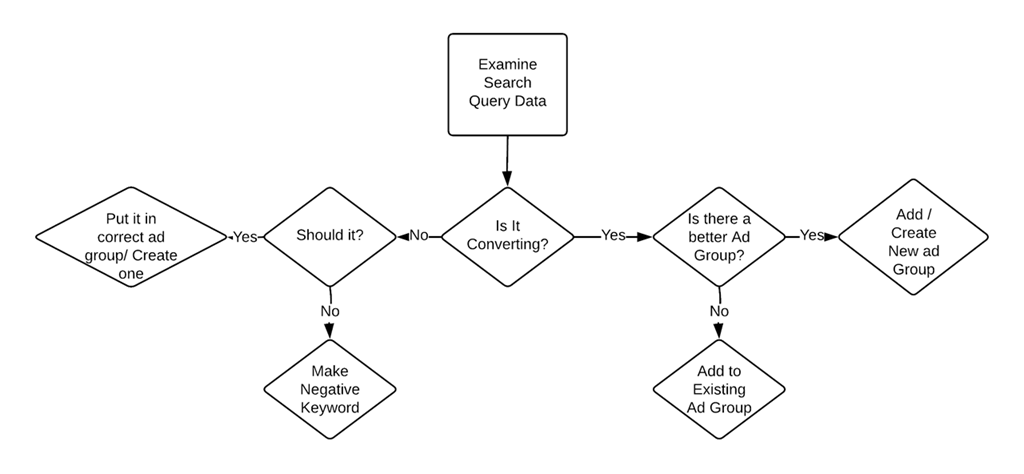
After looking at your search term data, you add a few new keywords. If you add these search terms to more relevant ad groups (or create new ad groups) than from where the queries were showing, you should see an increase in CTRs.
Impression changes
Top & absolute top impression shares
If your top and absolute top impression shares change, then you’ll see changes to your CTR. As this data is related to bidding, ad extensions, and quality scores, we’ve written a diagnosis article on this topic that you can see here: PPC & KPI monitoring: how to diagnose lost search impression share rank & top impression share changes.
What this means is that any changes to bids, bid modifiers, quality score, and ad extensions can affect your CTRs.
Targeting changes
These target changes can affect your CTRs:
- Adding new keywords
- Changing match types
- Adding audiences
- Removing audiences
- Adding negative keywords
- Pausing keywords
If you have a search term that has a very high CTR and a very poor conversion rate, then add a negative keyword to stop showing for that search term. The result of that negative keyword should be a lower CTR (as you blocked a high CTR term), but also an increase in conversion rates.
Budgets
Budget can have some tricky effects on CTRs. Let’s say your budget is limited, which means you can’t serve ads in a campaign 100% of the time. What happens is that the keywords and ads that received traffic during one time frame can easily switch during the new time frame. The keywords and ads might not have changed CTRs. However, what did change was their display frequency, resulting in more or fewer impressions.
If you raise your budget, then keywords that weren’t showing all the time might show more often. If those were low CTR words, that could lower your CTRs.
Match type usage
Your usage of match types can affect CTRs, especially if the search terms change over time.
For instance, if you use broad match, as your quality score goes up, you can show for a wider variety of search terms. These terms are usually less relevant than the initial terms, which can lower your CTR.
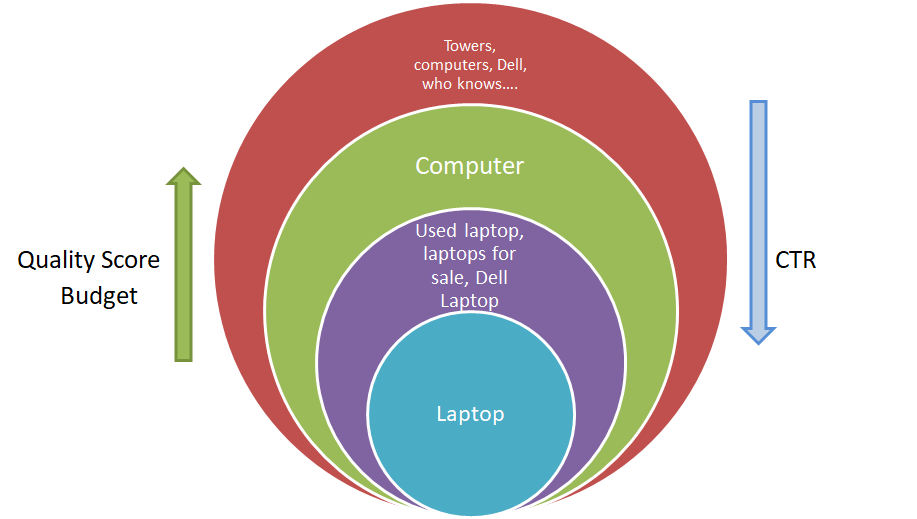
This is a complex topic, so we have an entire article on the phenomenon: How using broad match can lower your CTR as your quality score increases.
These changes are almost always driven by the search terms for which your ads were displayed. When you see significant changes in CTRs that aren’t from some of the previous factors, take a look at your search query changes over time.
Changes in how match types function
We’ve seen Google change exact match, phrase match, and modified broad match quite a bit in the past year. This latest change has lead to a lot of duplicate search terms (search terms showing from multiple ad groups) and volatility in CTRs and conversion rates for quite a few advertisers. You can read more about the latest changes here: How to work with the latest Google Ads match type changes.
Wrap-up
Changes in click through rates aren’t always bad. If you add a negative keyword with a high CTR, but poorly performing search term, and your conversion rate goes up while your CTR goes down, that is a net positive for the account.
What you’re usually looking for is times that your conversion rate didn’t change much (or dropped, but that’s another article) and your CTR went down. That result is often fewer clicks, and if your impressions didn’t change, then fewer conversions.
The primary time to dig into CTR changes is when your total volume of clicks is dropping, and you see fewer conversions for your account. The other time is when you see your quality scores dropping. As CTR is a significant factor in Quality Score, ensuring you maintain a healthy CTR also helps with good quality scores.
When diagnosing changes to CTRs, start with the obvious:
- Targeting changes
- New ads
- Budget changes
- Organizational changes
You usually remember those types of changes, so it can be easy to check if any of those changes were made in your account. If that’s not the issue, then you need to look into changes to your search terms and impressions for your ads. Once you have diagnosed why your CTRs changed, then you can put new strategies or changes in place.
Find out more about how Adalysis can help with KPI monitoring
Share around the web


Related posts
View all
When to pause exact match and rely on broadmatch instead
When to pause exact match and rely on broad match instead
Search term challengesAl Max
Search term challenges Al Max




Improve performance
with
actionable
analysis


I’ve learned something good from this blog. The information provided is great and helpful. Thanks for sharing.
Leave a comment