When to pause exact match and rely on broad match instead
By Brad | 0 comments February 11, 2026
Categories
For years, there was a simple piece of advice that worked 99.99% of the time. If you have a search term consistently converting, you should make it an exact match keyword. This meant:
- You ensured your ad was showing
- You knew its quality score
- You could evaluate its impression share
- You could ensure the ad and landing page were relevant to the search term
That advice is only 97% accurate now. You might be thinking, does a 2.99% change really matter? Yes, because the change usually affects your highest-spending keywords.
What this looks like in practice
Consider this scenario. You’re selling patient management software for optometrists. You evaluate the search terms for the keyword and see this data:
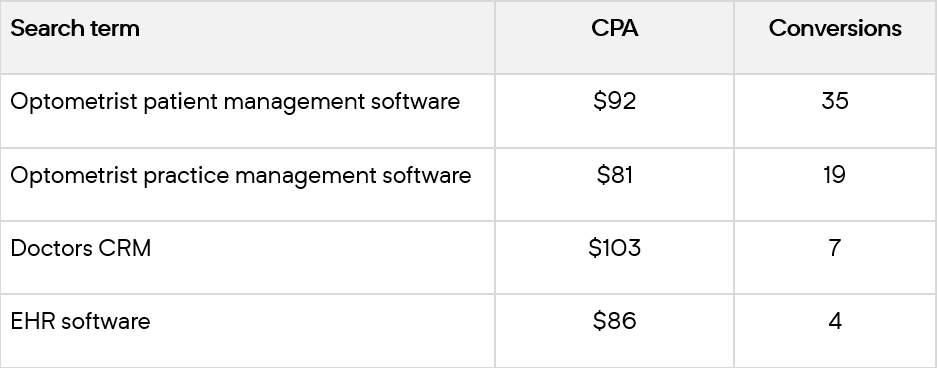
Doctors CRM and EHR software describe the entire industry and not just optometry. However, they consistently convert and have good CPAs. You make an ad group with these keywords and ads that specify you only service optometrists.
After a month, this is your search term data for those keywords:
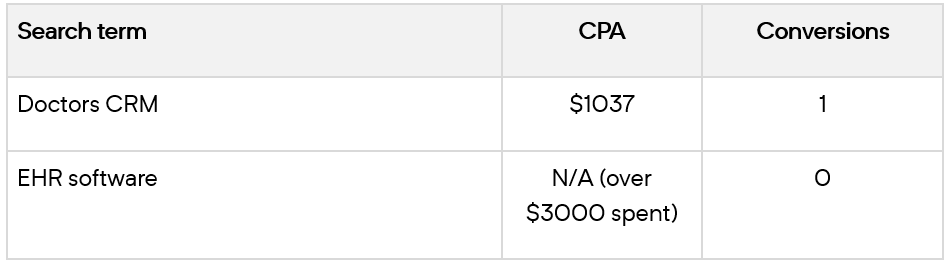
The search term was working, so you did the right thing and made it a keyword. Now, you’re considering whether it should be a negative keyword. That’s quite a change.
What the data doesn’t show
What happened? Let’s start by looking at how broad match works, especially when using Target CPA or Target ROAS bidding. Broad match uses additional signals to decide whether to show an ad. They include previous search history, other keywords in the ad group, and the landing page.
What you can’t see is the user’s journey before clicking on your keyword. What if someone ran these searches over the past month:
- What software will help me organize my practice?
- What software will help me organize my optometrist practice?
- Best optometrist practice management software
- What is EHR
- EHR software
The user clicks the last search term, EHR software, and converts. That’s the only data you see. However, because the user started with optometrist searches, broad match showed your ad to them for a more general term.
Before you added the search term as a keyword, you received only a few hundred impressions a month for search terms like EHR software. After adding the search term as a keyword, you showed for thousands of searches per month. Most of them were irrelevant to your business.
All impressions are not equal. You went from showing for a few decent impressions to all of them, including the poor ones.
What to do next
You pause the exact match keyword and let broad match capture it.
Depending on your data, you can take a bit more control over how that search term is being matched. This is where we turn to duplicate search term data. (Screenshots from Adalysis PPC optimization software.)
In this first example, the search term appears in 14 ad groups. The ad groups have CPAs between $107 and $137.
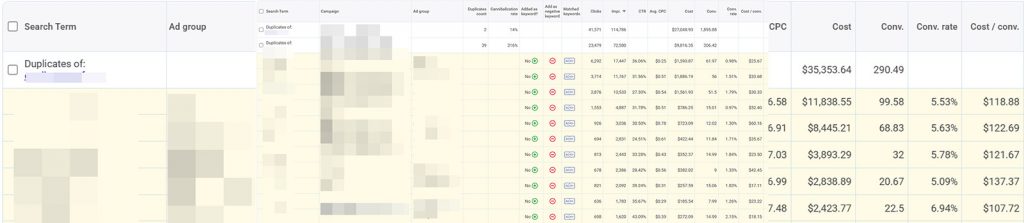
The ad group with a $107 CPA and the highest conversion rate is ultra-specific. It won’t be relevant to most people conducting this search. Since all the ad groups have similar CPAs, we pause the keyword so Google can serve the search terms based on its broad match algorithm.
In this second example, there are 39 ad groups showing for this search term. The search term doesn’t work well as a keyword, but it has a lot of conversions when we let Google randomly show it. However, our CPAs range from $18 to $60. This account has a target CPA of $25.

Therefore, we add exact match negative keywords to the ad groups that have high CPAs and let Google show ads for this search term from the other ad groups.
More real-world examples
This approach works best for keywords that have high search volume and aren’t very specific.
Here are examples we’ve seen where letting Google match search terms via broad match outperformed adding those terms as keywords.
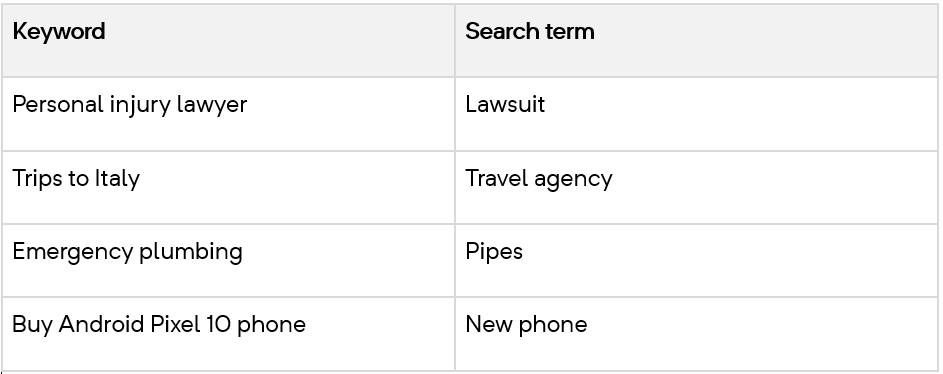
Instead of adding negative keywords, the accounts paused the exact match keyword. They then allowed Google to show ads for these search terms from their broad match keywords. In most cases (there were exceptions), they started receiving conversions for these search terms again.
Wrap-up
Should you follow this advice for all your search terms?
Absolutely not.
In most cases, the right step is to turn a search term that consistently converts into an exact match keyword. With a descriptive ad and landing page, you’ll end up with more conversions at a similar or lower CPA to what you had before.
Sometimes, the search terms perform terribly and should be made into negative keywords.
This approach is for the exceptions. When you add a converting search term as a keyword, but it then spends heavily without delivering results, broad match can be a better option.
Broad match has become much better than in the past IF you are using a bid strategy that focuses on conversions and a target (ie. Target CPA/ROAS).
Some high-volume search terms bring in conversions but fail when you add them as keywords. For these exceptions, allowing broad match to capture them has proved successful for many accounts.
Share around the web


Related posts
View all
Search term challengesAl Max
Search term challenges Al Max






Improve performance
with
actionable
analysis


Leave a comment